
If your employee is expecting a baby, she may be entitled to Statutory Maternity Pay (SMP). This replaces her normal earnings to help her take time off around the time of the birth. She also has a statutory right to a minimum amount of maternity leave.
Whether you have to pay SMP to an expectant employee depends on how long they have worked for you and how much they earn. They will have to provide you with evidence of when the baby is due and give you notice of when they want you to start paying their SMP.
Payments of SMP count as earnings. You must deduct tax and National Insurance Contributions (NICs) from them in the usual way.
You will normally be able to recover some or all of the SMP you pay.
Entitlements
An employee who is expecting a baby has the right to 26 weeks of 'Ordinary Maternity Leave' and 26 weeks 'Additional Maternity Leave' - making one year in total.
But you only have to pay them SMP if they meet certain conditions. They must have:
-
worked for you continuously - full or part-time - for at least 26 weeks up to and into the 15th week (known as the Qualifying Week) before the week the baby's due
-
average earnings at least equal to the lower earnings limit for NICs, £125.00 a week for 2025/26, in the relevant period up to the Qualifying Week
-
given you the right paperwork confirming the pregnancy and sufficient notice of when they would like the SMP payments to start
SMP will be paid for 39 weeks.
Average Weekly Earnings
The calculation of the average weekly earnings is very important because it not only determines if the woman qualifies for SMP but also how much she qualifies for. To qualify for SMP an employee must have average weekly earnings of at least the NIC LEL amount, £125.00, at the end of the Qualifying Week.
How Much Do You Need To Pay
SMP is paid as follows:
First 6 weeks - 90% of average weekly earnings with no upper limit.
Remaining 33 weeks - The lower of either the standard rate (currently £187.18) or 90% of average weekly earnings.
Recovery of SMP
All employers are entitled to recover 92% of SMP they pay, however if the employer qualifies for Small Employers Relief, where the total NIC in the qualifying tax year was under £45,000, they can recover 100% of SMP paid plus an additional 8.5% in compensation for the employer’s share of NIC due on these payments.
Should you qualify for Small Employer's Relief, ensure the box is ticked within Employer > Edit Employer Details > Registration Details: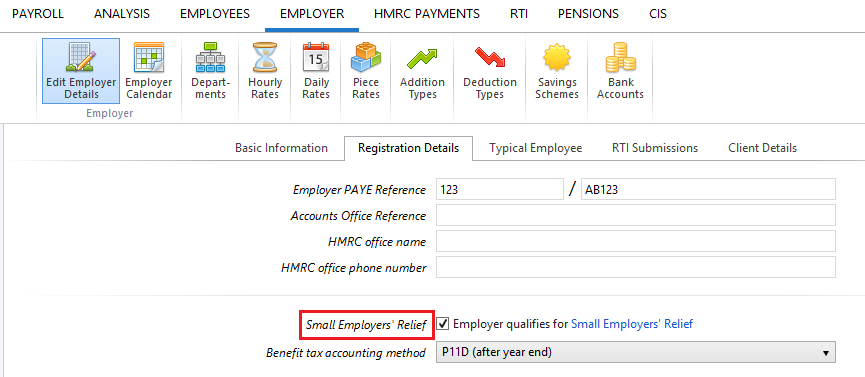
Calculating SMP in BrightPay
To access this utility, simply click 'Payroll' and select the employee’s name on the left:
- Under Statutory Pay, click Calendar
-
On the Calendar, click on the date that the baby is due
- Select Maternity Leave from the Parenting Leave section at the top right of the screen
Leave Dates
- Enter all relevant dates and select the employee's Length of Leave from the drop down menu
- In the event the employee has a Pregnancy Related Illness, enter the Illness Start Date
Average Weekly Earnings
Within the Average Weekly Earnings section, BrightPay will now offer you three ways of establishing the employee’s average weekly earnings for the purpose of calculating SMP due.
-
I want BrightPay to calculate the average weekly earnings (AWE) - with this option, BrightPay will attempt to automatically calculate the employee's AWE. Where a calculation is possible, full details of the calculation will be displayed. Where the software detects any potential issues with the calculation (e.g. no payment history, more/fewer earnings than expected, unsupported pay schedule) a warning will be given to the user:
-
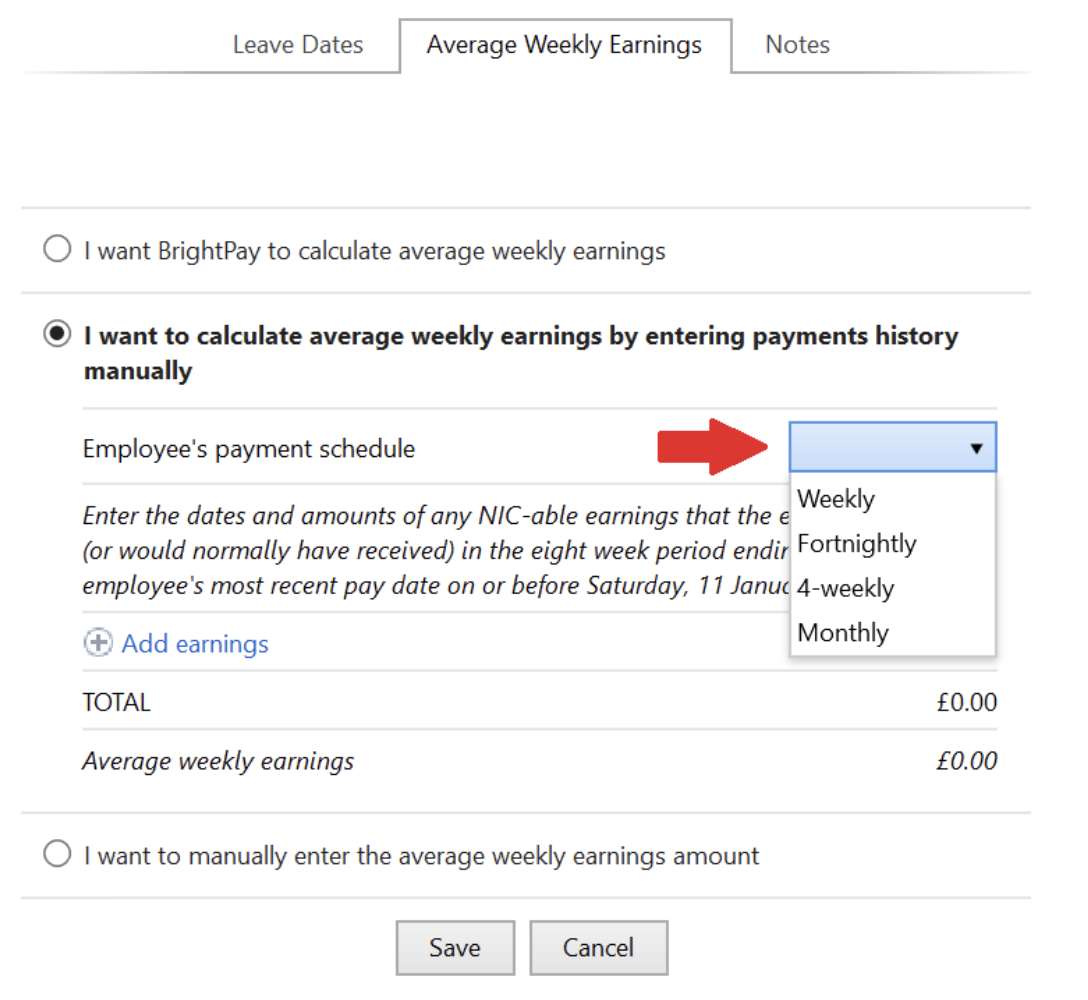
I want to calculate the average weekly earnings by entering payments history manually - where BrightPay is unable to calculate the employee's AWE automatically (e.g. where a different software was used previously and historical pay data is not available to BrightPay), this option allows users to enter the dates and amounts of the employee's earnings history manually, which BrightPay will then use to calculate the employee's AWE.
-
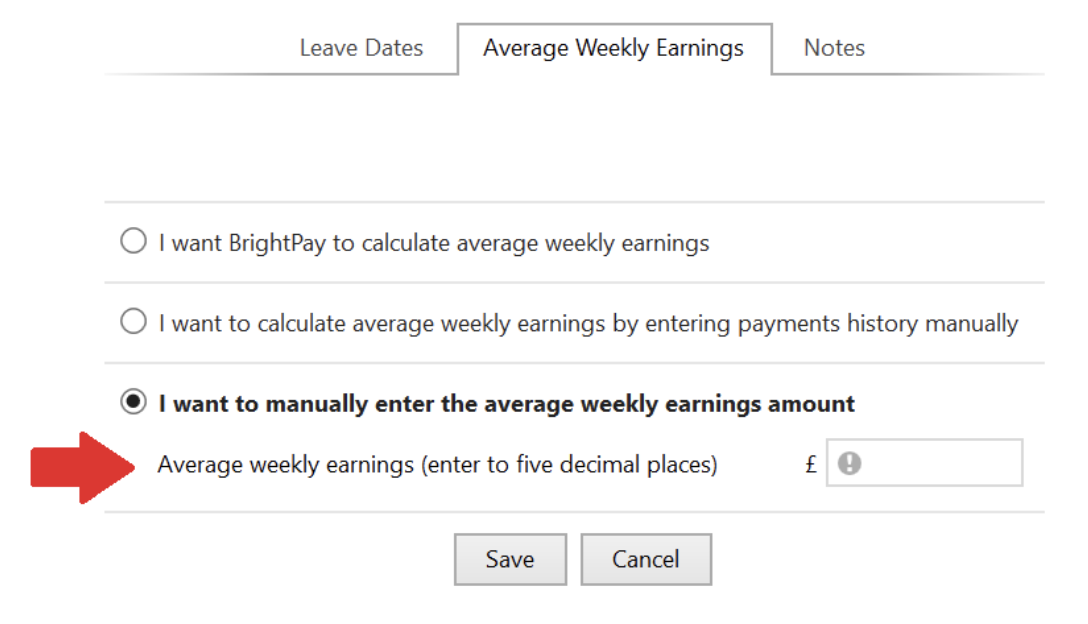
I want to manually enter the average weekly earnings amount - the user can at their discretion use this option instead to enter the employee’s average weekly earnings figure, where this is known.
Notes
Use the Notes section to enter any relevant notes relating to the employee's parenting leave.
Click 'Save' when the parenting leave details are completed. The program will automatically update the calendar accordingly and apply the SMP due
Editing the Length of Maternity Leave
Should an employee wish to extend or reduce the length of their maternity leave, the length of leave already entered for the employee can be edited as follows:
- In Payroll, select the employee’s name on the left
- Under Statutory Pay, click on Calendar
- On the Calendar, select any date in advance of the current payroll date and which is currently marked as Maternity Leave
- Within the Maternity Leave section that will appear to the right of the calendar, click the Edit icon
- Amend the employee’s Length of Leave by selecting the number of weeks now applicable from the drop down menu
- Click Save
- Close the Calendar to return to the main Payroll screen
Keeping in Touch Days (KIT)
During the maternity period, an employee can work 10 days without losing any SMP. These KIT days can be taken separately, consecutively or in a block. The employee may be paid for KIT days. If the employee exceeds 10 KIT days, this will result in the loss of SMP for the week in which the work is done.
To record Keeping In Touch Days in BrightPay:
1. Under Employees, select the employee from the listing and click their Calendar tab.
2. On the Calendar, select the date of the Keeping In Touch day and click 'Keep In Touch Day' on the right hand side
3. Repeat if further Keeping In Touch Days are taken
As soon as the number of Keeping In Touch Days recorded in the employee's calendar exceeds 10 days, BrightPay will notify you in the relevant pay period that the employee is not entitled to any SMP due to having taken their 11th (or higher) Keep in Touch day
How BrightPay calculates SMP
BrightPay uses the full statutory week method when calculating & applying SMP.
Monthly Payroll Example:
Maternity Leave begins on a Wednesday. Therefore the last day of the SMP week will be a Tuesday.
SMP will thus begin in the pay period in which the first Tuesday of the maternity leave falls
BrightPay will then establish how many Tuesdays fall in the pay period and apply the weekly SMP rate to the number of Tuesdays there are.
Weekly Payroll Example:
Maternity Leave begins on a Wednesday. Therefore the last day of the SMP week will be a Tuesday.
SMP will thus begin in the weekly pay period in which the first Tuesday of the maternity leave falls
SMP1 Form
In the event that an employee is not entitled to SMP, employers are to complete form SMP1 to tell the employee the reason why.
Form SMP1 can be completed in BrightPay and subsequently printed or exported to PDF for emailing.
To complete form SMP1:
a) Within Employees, select the employee in question from the left hand listing
b) Click 'More' on the employee's menu bar, followed by 'SMP1...'
c) Complete the SMP1 form accordingly
d) Click Print/ Preview to view the completed form
e) Click Print, Email or Export PDF, as required
Maternity Leave Support
Employers need to ensure that they follow correct procedures in relation to maternity. Being listed as a protected characteristic, incorrect management of pregnancy and maternity leave could leave employers open to discrimination claims.
Bright Contracts has developed a detailed Maternity Leave Checklist to assist employers.
A template letter from an employer to an employee confirming her maternity is also available here.
Note: The Statutory Maternity Rate for 26/27 tax year is not programmed into the 25/26 tax year software. If your employee's maternity leave goes into the 26/27 tax year (or starts in the 26/27 tax year), it will not be possible to get the Statutory Pay Calculation to go beyond 5th April 2026 - you will see a message such as 'Employee is not entitled to SMP because her average weekly earnings are not high enough.'
Once the employer has been imported into BrightPay Cloud 26/27 tax year, then any periods 6th April 2026 onwards will then show at the correct 26/27 tax year rate.
The SMP rates, along with other statutory pay rates are confirmed in the UK Spring Budget in March. Until this time, there will be no confirmation of the rates to be used in a following tax year.