
In the event that you need to make a subsequent payment to an employee after they have left your employment, a dedicated facility is available within BrightPay to facilitate this.
- Within ‘Payroll’ select the pay period in which you wish to make the payment after leaving.
- Click ‘More’ on the menu bar, followed by ‘Add Payment After Leaving’ Payslip..’.
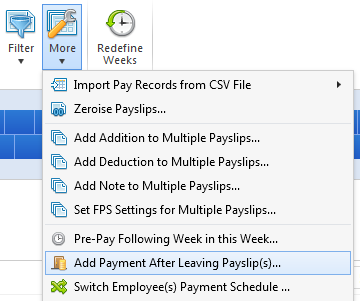
- Select the employee or employees in question and click ‘OK’. In line with HMRC guidance, all payment after leaving payslips will use tax code ‘0T’ on a week 1/month 1 basis.
- Process the employee’s payslip as required and finalise the payslip as normal.
The employee and their payment after leaving details will subsequently be included in the relevant FPS for submission to HMRC.