
To view the details of an employee's attachment orders as well as the schedule of deductions that have taken place, users can access the employee's Attachment Order Summary Report at any time.
This report is available in two places:
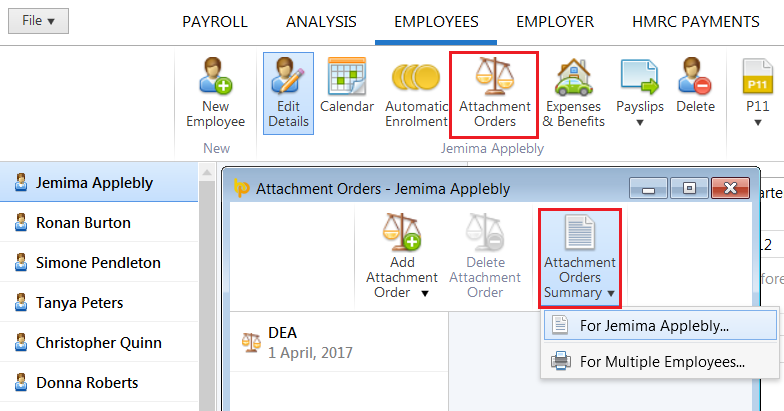
a) Within 'Employees', select the employee in question, followed by 'Attachment Orders' on the employee's menu bar
- Click 'Attachment Orders Summary', followed by the employee's name. Alternatively, select 'For Multiple Employees...' in order to view more than one employee's attachment order report.
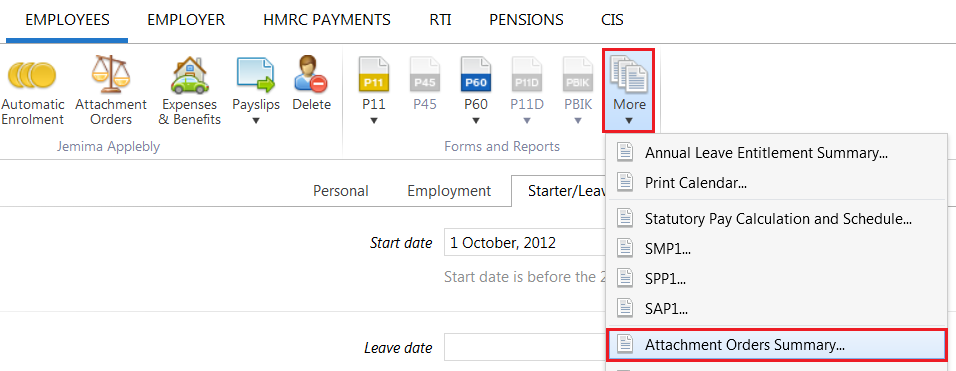
b) Within ‘Employees', click 'More’ on the menu bar, followed by 'Attachment Orders Summary...'
- select the employee(s) whose attachment order report you wish to view and click 'OK'
c) Press Print/Email/Export PDF as required.