
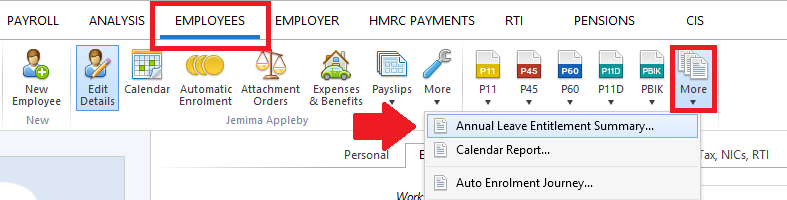
To view/print an employee's annual leave entitlement at a particular date, simply select the Employees tab.
- Click 'More’ on the menu toolbar, followed by ‘Annual Leave Entitlement Summary’
- Untick the employees you do not wish to print the summary for and select the ‘To date’ you require.
- Select 'OK'
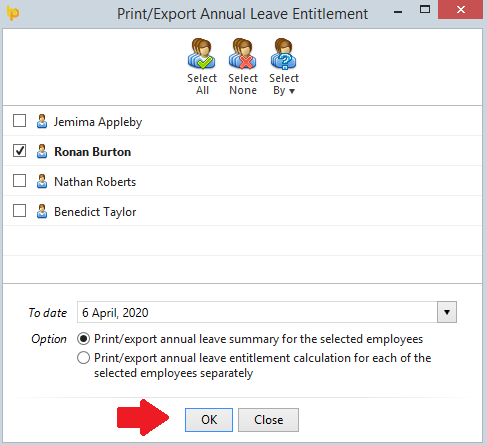
- Click 'OK' to view your selection on screen
- Click 'Print/Email/Export PDF' on the toolbar as required
Viewing/Printing Annual Leave Entitlements for Multiple Employees
To view/print annual leave entitlement reports for multiple employees at a particular date, simply select the Employees tab.
- Click 'More’ on the menu toolbar, followed by ‘Annual Leave Entitlement Summary’
- Simply select the employees whose leave entitlement you wish to view or print and select the ‘To date’ you require.
- Select whether you would like to view/print an annual leave summary for the selected employees or whether you would like to view/print separate annual leave entitlement calculations for each of the selected employees.
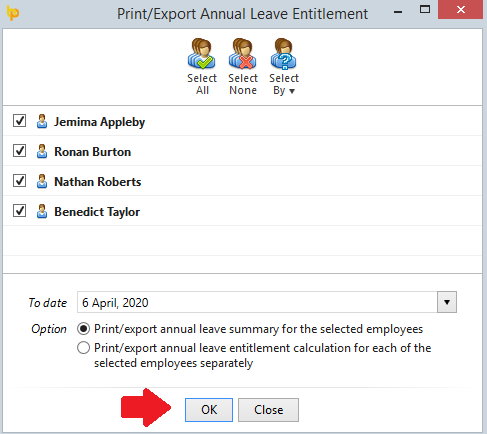
- Click 'OK' to view your selection on screen.
- Click 'Print/Email/Export PDF' on the toolbar as required